

Managing credits is part of the Plus plan.
Add a credit
1
Open the Credits page
In the sidebar, click Credits.
2
Add a new loan
Click Add, then choose Import contract to fill in the details from the contract PDF or image, or Fill in manually. If the document you upload holds no loan data, guito tells you so instead of filling anything in — you can try a different document, or fill the details in manually.
3
Fill in the credit details
- Type: mortgage, personal loan, car loan, and others.
- Financed amount: total loan amount. The currency defaults to the euro; a loan in another currency is recorded in that currency and converted to euros in your net worth totals. If there is no exchange rate for the start date, guito tells you when you save: pick another date, or record the credit in euros.
- Interest rate: choose fixed, variable (indexed to Euribor) or mixed. On a fixed rate, enter the contract’s annual rate. On a variable rate, what you enter is the index (3, 6 or 12-month Euribor) and the bank’s spread: the annual rate is the sum of the two, and guito works it out for you, following every Euribor revision. On a mixed rate you enter both: the annual rate for the fixed period, and the spread that applies afterwards. A credit recorded in a currency other than the euro only supports a fixed rate — a variable rate follows Euribor, which is a euro index.
- Total term: duration in months.
- Start date: the date the loan was taken out.
- Amortization method: constant payment (French amortization) or constant principal (German amortization, with a decreasing installment).
4
Save
Confirm to save the credit.
Add notes to a credit
When you add or edit a credit, use the Notes field to record what you want to remember — contract terms, or your account manager’s contact details. The note appears in the Notes section of the credit’s page.Link a credit to a property or vehicle
When you add a mortgage, you can link it to a property you track; a car loan can be linked to a vehicle. Once linked, the asset’s detail page shows a financing breakdown: loan-to-value (LTV), the down payment, the financed amount, and your equity (the asset’s current value minus what you still owe). These figures appear only if the asset has a recorded acquisition cost that is at least the financed amount — otherwise the Financing section asks you to add it.Keep a credit up to date
Open a credit from the Credits page. From its detail page you can:- Record payments as they’re paid. A payment is recorded on one of the plan’s installment dates: that is the installment it settles, and how the outstanding balance and the payoff date move. If the transfer left your account on a different day, pick the installment’s date.
- Correct or delete a payment you already recorded: in the Payment history section, click the payment’s row to open the amount you paid, change it, or delete it. The date stays as it was, because the payment belongs to the installment it settled.
- Record early repayments.
- Change the interest rate (renegotiation) by editing the credit.
- View the full amortization schedule.
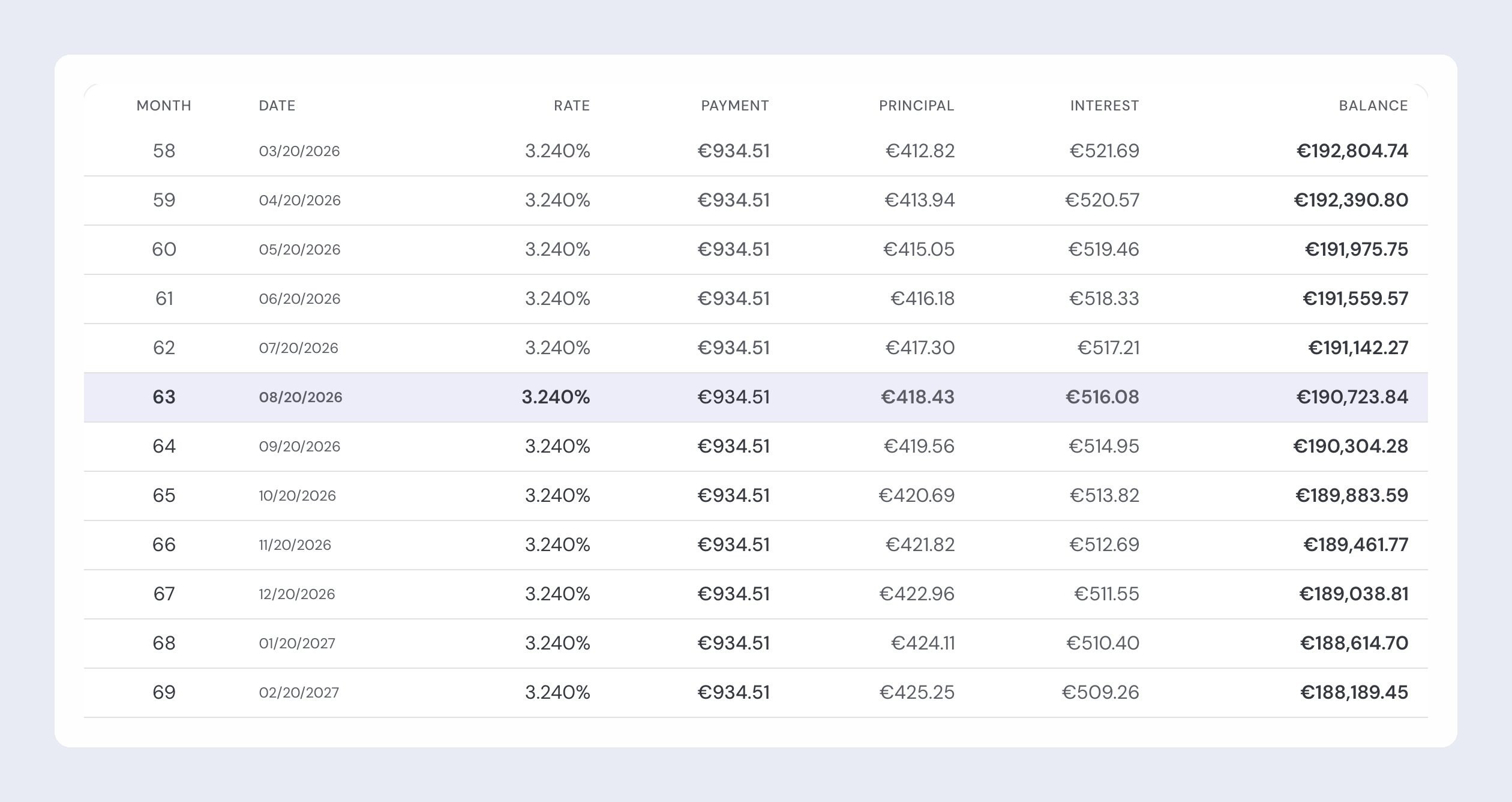
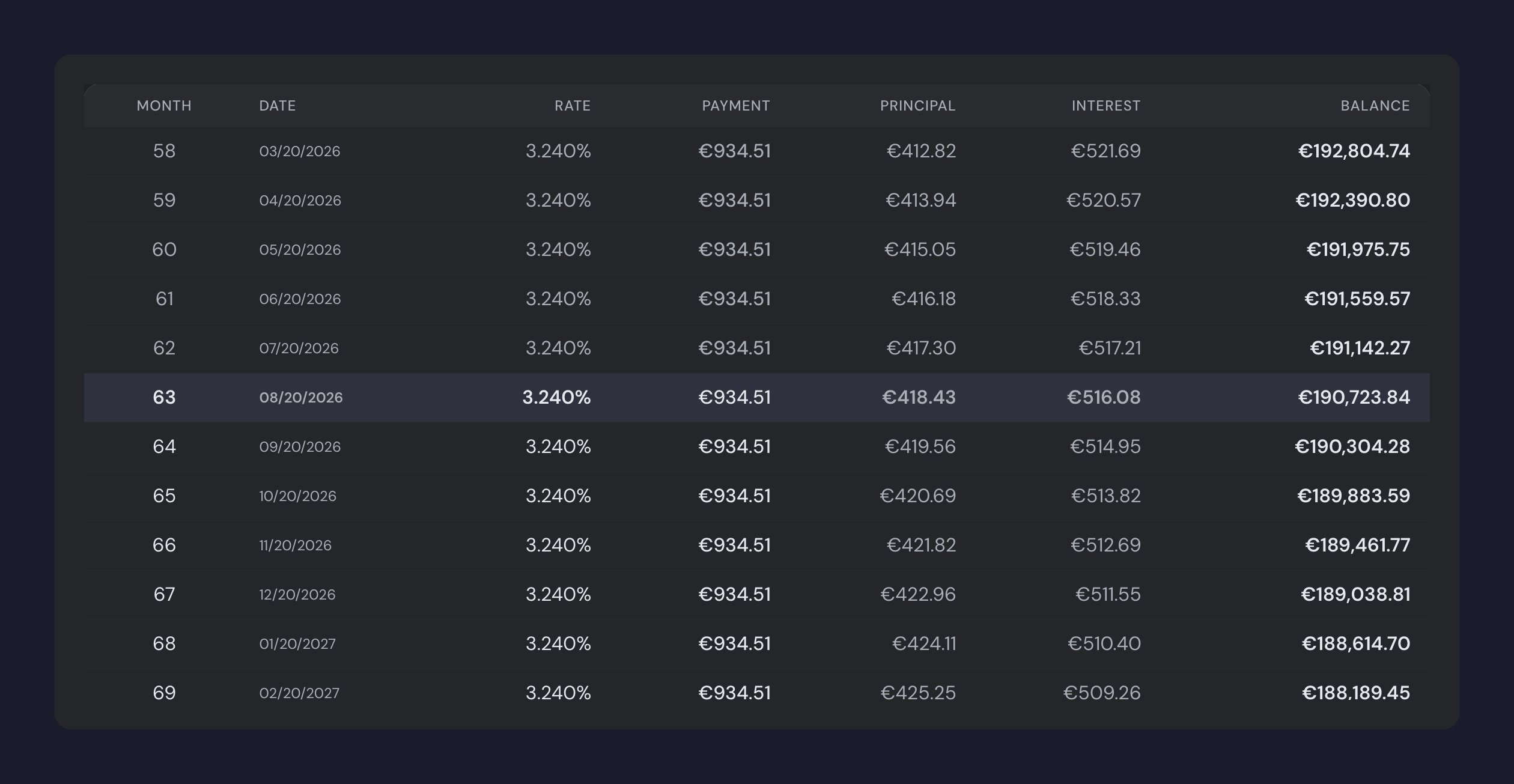
Which installment you are looking at
The Monthly payment is always the plan’s next installment: what you will pay next month, with the early repayments, Euribor revisions and balance reconciliations you recorded already applied. It is the only instalment guito shows you, so two numbers never compete for the same name. The figure you entered when you created the credit is the plan’s starting point. When you edit the rate or the term, guito recalculates the payment automatically; if you had entered a payment of your own, it asks you to confirm before replacing it.Which rate you are looking at
The rate a credit shows you is the one the plan applies to the next installment, not the one you entered when you created the credit. On a variable or mixed rate, guito follows Euribor: when the index moves, the rate on screen moves with it at your contract’s next revision. That way the rate and the installment beside it always describe the same month. On a credit that has already ended, where there is no next installment, guito shows the contract rate.What an early repayment changes
An early repayment comes off the outstanding principal, and guito recalculates the installment from there. The term does not change: the installment is what drops, not the end date. Before you record it, the screen shows you the principal that will be left, the installment you will pay from then on, and the end date — so you decide with the figures in front of you rather than after the fact.Tax on interest
Stamp duty on the interest is part of the plan as its own share of the installment, alongside principal and interest. If you leave the Tax on interest field empty, guito applies the usual rate for the credit type: 4% on personal and car loans, 0% on a mortgage (exempt). The credit always shows you the rate being applied and flags when it is the default one, so you can enter your contract’s rate if it differs.Match installments to bank transactions
To have each installment linked to the bank transaction that paid it, connect the account you pay from, using automatic sync. guito then links matching installments automatically. A link is created only when there is a single clear match: the amount and the date line up, and the payee is the same as on previous installments. If the amount changed a lot, no link is created and you can record it yourself. By default, guito looks for the installment across all your connected accounts; if you fill in the Account to debit on the credit, it only looks in that account. Linking happens when the account syncs and guito finishes processing the new transactions. guito looks for the installments it has no record of yet, so it also links earlier months, as long as the transactions are in the account’s history. An installment paid from an account you have not connected is still yours to record in Payment history.To undo a link, open the credit and delete the payment in the Payment history section. The payee is then excluded so the match is not repeated.
Track installments alongside other commitments
Each credit’s monthly installment appears on the Recurring page, in the Expenses list, next to your other recurring expenses.Related pages

Net worth overview
See how the outstanding balance of your credits reduces your net worth.

Accounts
Manage the accounts you pay installments from.

Bank sync
Connect your accounts to match installments automatically.

Properties and assets
Link a mortgage to a property and see its LTV and equity.