

Properties and assets is for what you own and what it’s worth: a home, a car, gold, a piece of art. Money you put to work, such as a balance on a P2P platform, a stake in a startup, a company share you track as an investment, or money you lent to someone, belongs under investments valued by you, where it carries an amount invested, a return and a value history. The practical difference: an asset has valuations, an investment has a return.
Add an asset
1
Open the Property & valuables page
Go to Property & valuables in the sidebar.
2
Add the asset
Click Add.
3
Fill in the details
- Name: for example, “City apartment”.
- Category: select “Real estate”.
- Acquisition cost: the purchase price, in euros or another currency you pick in the form’s currency selector. If guito doesn’t have an exchange rate for that currency on the acquisition date, it tells you when you save: pick another date, or record the asset in euros.
- Acquisition date (optional): when you bought it.
4
Save
Confirm to save.
Recorded an investment here — a crowdlending platform balance, or money you lent someone? Under Other, the options menu (⋯) on the asset’s detail page has Move to investments, which turns it into one of the investments valued by you, with the history you already recorded. The option appears only if the asset isn’t archived and has an acquisition cost above zero. There it gains a return and an IRR (your gain expressed as a yearly rate).
Update an asset’s valuation
1
Open the asset
In Property & valuables, click the asset you want to update.
2
Add the valuation
On the asset’s detail page, click Add valuation.
3
Fill in the details
- Date: the date of the valuation.
- Value: the new estimated value.
4
Save
Confirm to save.
Valuations are always manual: guito does not fetch market prices for these assets. Only the most recent valuation feeds your net worth, and values in another currency are converted to euros. The full valuation history is kept so you can track how the value changes.
Add notes to an asset
When you add or edit an asset, write what you want to remember in the Notes field — a vehicle’s license plate, an item’s serial number. The note appears on the asset’s page.Link a credit
If you bought a property with a loan and also track that loan as a credit in guito, you can link the two. The property’s detail page then shows the down payment, the financed amount, the loan-to-value ratio (LTV), and your equity (the share of the property’s value that is already yours: its current value minus what you still owe), so you can see the property’s real contribution to your net worth. These figures appear only if the property has a recorded acquisition cost that is at least the financed amount — otherwise the Financing section asks you to add it.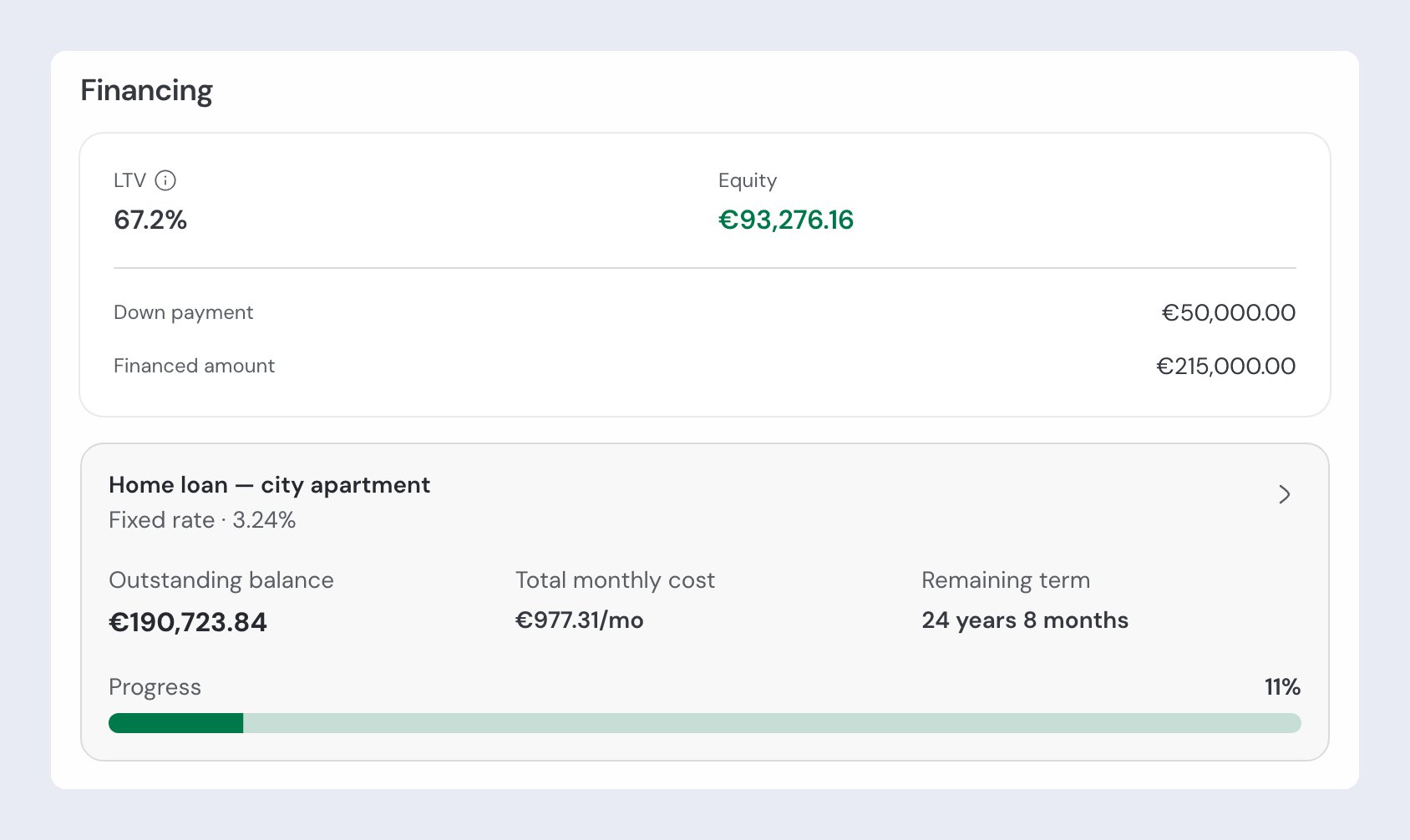
Archive and unarchive assets
Archiving an asset removes it from the list without deleting it. Useful for assets you’ve already sold or no longer want to track. On the asset’s page, open the options menu (⋯) and click Archive. To bring it back, open the options menu (⋯) at the top of the page, turn on Show archived, click the asset and choose Unarchive.Related pages

Net worth overview
How your assets feed into the overall net-worth view.

Accounts
Your bank and manual accounts, with their balances.

Investments
Portfolios, positions and the value of your investments.

Credits
Loans and mortgages, including those linked to a property.